> ## Documentation Index
> Fetch the complete documentation index at: https://javaai.pig4cloud.com/llms.txt
> Use this file to discover all available pages before exploring further.
# 火山引擎 API 对接
* ⭐️ **请先 Star 本项目后再提问,作者精力有限,未 Star 直接 Close**
* 🐞 [GitHub ISSUE](https://github.com/pig-mesh/deepseek4j/issues) 需包含:问题截图 + SDK版本 + 配置代码
本文将介绍如何使用 deepseek4j 接入 火山引擎 的 R1 模型。
## 参数获取
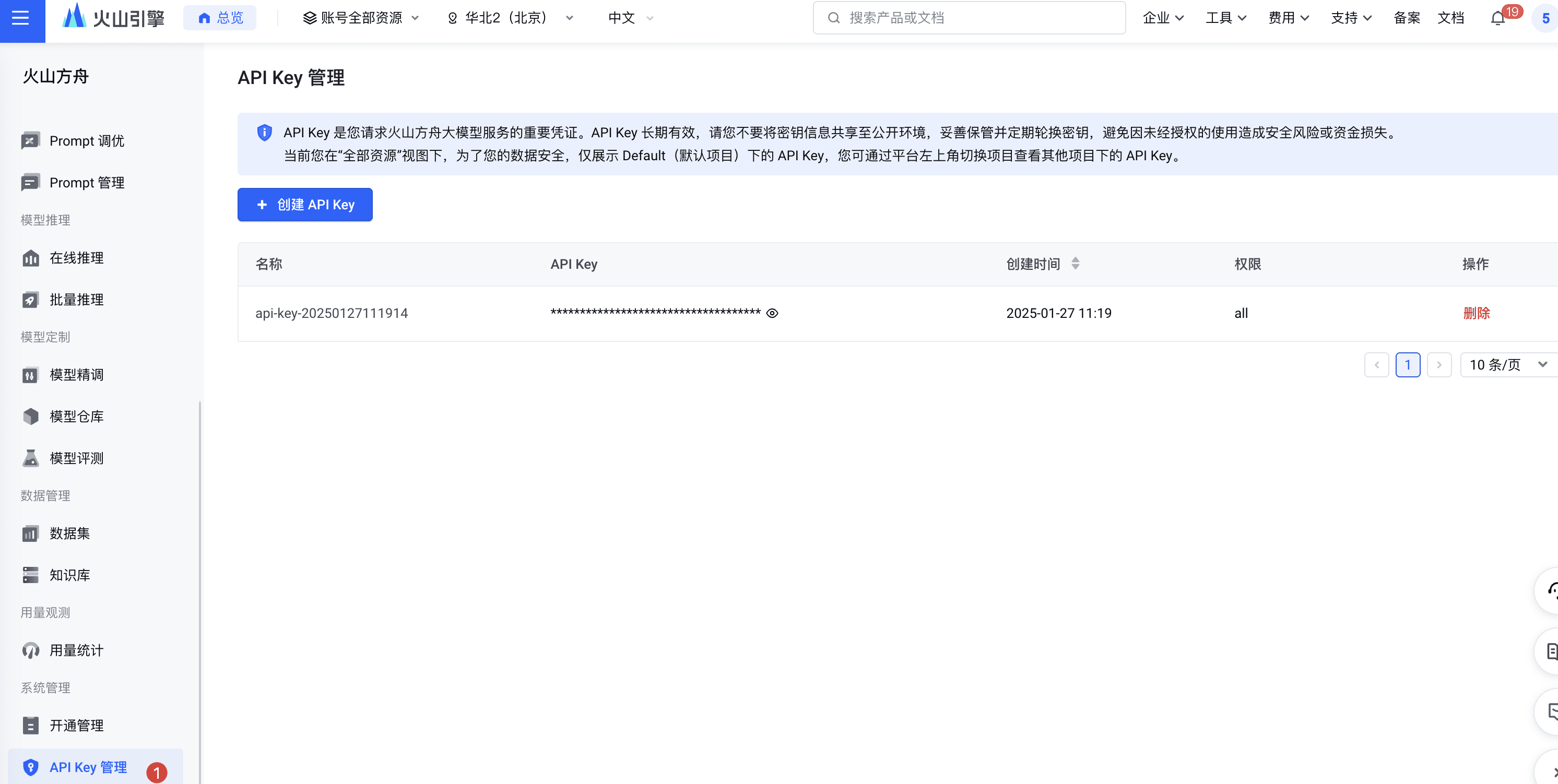
### 1. 获取 API key
 ### 2. 获取接入模型名称
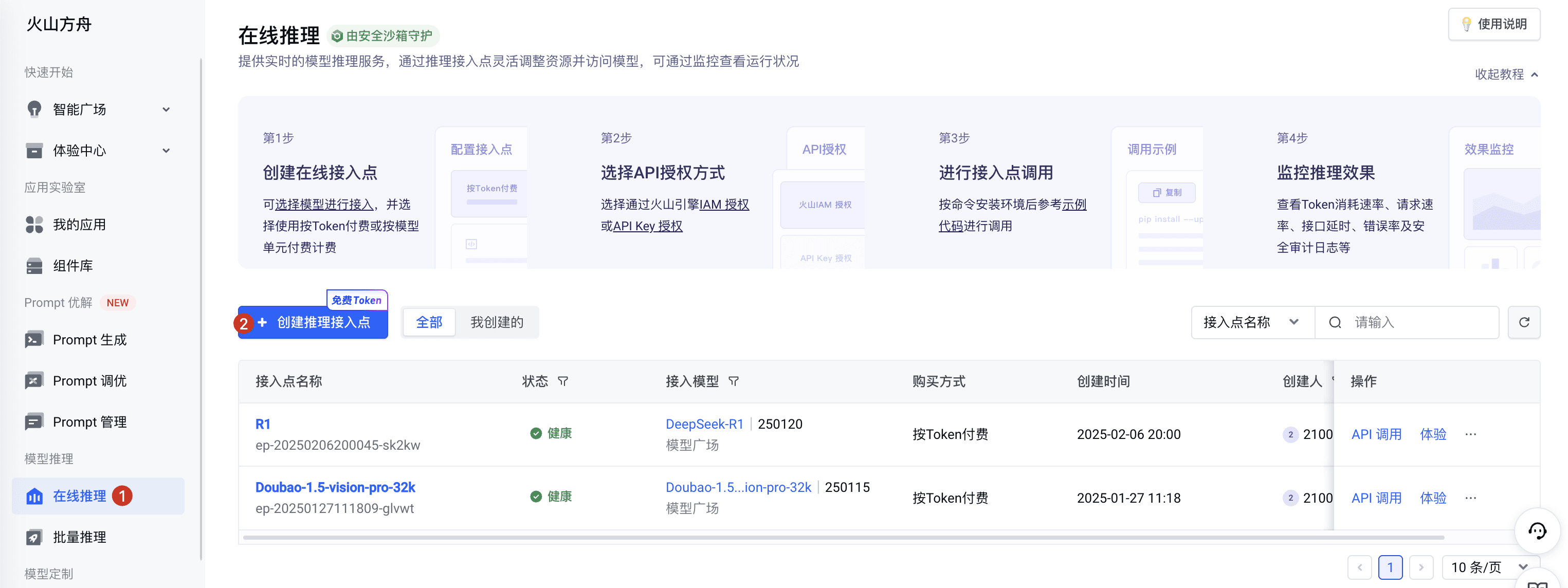 好别扭,这一段才是模型名称
 # deepseek4j 配置
### 1. 配置文件设置
在 `application.properties` 或 `application.yml` 中添加以下配置:
注意模型名称和上边图片创建的接入点一致
```properties theme={"system"}
deepseek.base-url=https://ark.cn-beijing.volces.com/api/v3
deepseek.model=和上图接入点一致
deepseek.api-key=your-api-key
```
### 2. 代码示例
```java theme={"system"}
@Autowired
private DeepSeekClient deepSeekClient;
@GetMapping(value = "/chat", produces = MediaType.TEXT_EVENT_STREAM_VALUE)
public Flux chat(String prompt) {
return deepSeekClient.chatFluxCompletion(prompt);
}
```
**为Java开发者提供全栈式AI工程化解决方案**,强类型/高可维护性架构,内置30+主流大模型支持。
* **🔍 知识引擎体系**:RAG 知识引擎全自动化多模态解决方案
* **📝 AI-OCR 中枢**:复杂非标场景高精度识别
* **⚙️ 业务智能融合**:函数编排 + Chat2SQL,无缝对接现有业务系统
* **🛡️ N维风控体系**:敏感词/IP/Token/User 规则控制引擎
发现文档问题?点击此处直接在 GitHub 上编辑并提交 PR,帮助我们改进文档!
# deepseek4j 配置
### 1. 配置文件设置
在 `application.properties` 或 `application.yml` 中添加以下配置:
注意模型名称和上边图片创建的接入点一致
```properties theme={"system"}
deepseek.base-url=https://ark.cn-beijing.volces.com/api/v3
deepseek.model=和上图接入点一致
deepseek.api-key=your-api-key
```
### 2. 代码示例
```java theme={"system"}
@Autowired
private DeepSeekClient deepSeekClient;
@GetMapping(value = "/chat", produces = MediaType.TEXT_EVENT_STREAM_VALUE)
public Flux chat(String prompt) {
return deepSeekClient.chatFluxCompletion(prompt);
}
```
**为Java开发者提供全栈式AI工程化解决方案**,强类型/高可维护性架构,内置30+主流大模型支持。
* **🔍 知识引擎体系**:RAG 知识引擎全自动化多模态解决方案
* **📝 AI-OCR 中枢**:复杂非标场景高精度识别
* **⚙️ 业务智能融合**:函数编排 + Chat2SQL,无缝对接现有业务系统
* **🛡️ N维风控体系**:敏感词/IP/Token/User 规则控制引擎
发现文档问题?点击此处直接在 GitHub 上编辑并提交 PR,帮助我们改进文档!