> ## Documentation Index
> Fetch the complete documentation index at: https://javaai.pig4cloud.com/llms.txt
> Use this file to discover all available pages before exploring further.
# Anthropic Claude 3 聊天
[Anthropic Claude](https://www.anthropic.com/) 是一系列基础 AI 模型,可用于各种应用程序。
对于开发人员和企业,你可以利用 API 访问权限并直接在 [Anthropic 的 AI 基础设施](https://www.anthropic.com/api)之上进行构建。
Spring AI 支持 Anthropic [消息传递 API](https://docs.anthropic.com/claude/reference/messages_post) 进行同步和流式文本生成。
Anthropic 的 Claude 模型也可通过 Amazon Bedrock Converse 获得。
Spring AI 还提供专用的 [Amazon Bedrock Converse Anthropic](/spring4ai/api/chat/bedrock-converse) 客户端实现。
## 前提条件
你需要在 Anthropic 门户上创建一个 API 密钥。
在 [Anthropic API 仪表板](https://console.anthropic.com/dashboard)创建一个帐户,并在[获取 API 密钥](https://console.anthropic.com/settings/keys)页面生成 API 密钥。
Spring AI 项目定义了一个名为 `spring.ai.anthropic.api-key` 的配置属性,你应该将其设置为从 anthropic.com 获取的 `API 密钥` 的值。
你可以在 `application.properties` 文件中设置此配置属性:
```properties theme={"system"}
spring.ai.anthropic.api-key=<你的-anthropic-api-密钥>
```
为了在处理 API 密钥等敏感信息时增强安全性,你可以使用 Spring 表达式语言 (SpEL) 来引用自定义环境变量:
```yaml theme={"system"}
spring:
ai:
anthropic:
api-key: ${ANTHROPIC_API_KEY}
```
```bash theme={"system"}
export ANTHROPIC_API_KEY=<你的-anthropic-api-密钥>
```
你也可以在应用程序代码中以编程方式设置此配置:
```java theme={"system"}
// 从安全来源或环境变量中检索 API 密钥
String apiKey = System.getenv("ANTHROPIC_API_KEY");
```
### 添加仓库和 BOM
Spring AI 的构件发布在 Maven Central 和 Spring Snapshot 仓库中。
请参阅[构件仓库](/spring4ai/getting-started#artifact-repositories)部分,将这些仓库添加到你的构建系统中。
为了帮助进行依赖管理,Spring AI 提供了一个 BOM (bill of materials),以确保在整个项目中使用一致版本的 Spring AI。请参阅[依赖管理](/spring4ai/getting-started#dependency-management)部分,将 Spring AI BOM 添加到你的构建系统中。
## 自动配置
Spring AI 自动配置、启动器模块的构件名称发生了重大变化。
有关更多信息,请参阅[升级说明](https://docs.spring.io/spring-ai/reference/upgrade-notes.html)。
Spring AI 为 Anthropic 聊天客户端提供 Spring Boot 自动配置。
要启用它,请将以下依赖项添加到项目的 Maven `pom.xml` 或 Gradle `build.gradle` 文件中:
```xml theme={"system"}
org.springframework.ai
spring-ai-starter-model-anthropic
```
```gradle theme={"system"}
dependencies {
implementation 'org.springframework.ai:spring-ai-starter-model-anthropic'
}
```
请参阅[依赖管理](/spring4ai/getting-started#dependency-management)部分,将 Spring AI BOM 添加到你的构建文件中。
### 聊天属性
#### 重试属性
前缀 `spring.ai.retry` 用作属性前缀,允许你配置 Anthropic 聊天模型的重试机制。
| 属性 | 描述 | 默认值 |
| :----------------------------------------- | :------------------------------------------------------------- | :---- |
| `spring.ai.retry.max-attempts` | 最大重试次数。 | 10 |
| `spring.ai.retry.backoff.initial-interval` | 指数退避策略的初始休眠持续时间。 | 2 秒 |
| `spring.ai.retry.backoff.multiplier` | 退避间隔乘数。 | 5 |
| `spring.ai.retry.backoff.max-interval` | 最大退避持续时间。 | 3 分钟 |
| `spring.ai.retry.on-client-errors` | 如果为 false,则抛出 NonTransientAiException,并且不尝试对 `4xx` 客户端错误代码进行重试 | false |
| `spring.ai.retry.exclude-on-http-codes` | 不应触发重试的 HTTP 状态代码列表(例如,抛出 NonTransientAiException)。 | 空 |
| `spring.ai.retry.on-http-codes` | 应触发重试的 HTTP 状态代码列表(例如,抛出 TransientAiException)。 | 空 |
目前,重试策略不适用于流式 API。
#### 连接属性
前缀 `spring.ai.anthropic` 用作属性前缀,允许你连接到 Anthropic。
| 属性 | 描述 | 默认值 |
| :------------------------------------- | :----------------------------------------------------------------------------------------------------------- | :-------------------------- |
| `spring.ai.anthropic.base-url` | 要连接的 URL | `https://api.anthropic.com` |
| `spring.ai.anthropic.completions-path` | 要附加到基本 URL 的路径。 | `/v1/chat/completions` |
| `spring.ai.anthropic.version` | Anthropic API 版本 | `2023-06-01` |
| `spring.ai.anthropic.api-key` | API 密钥 | - |
| `spring.ai.anthropic.beta-version` | 启用新的/实验性功能。如果设置为 `max-tokens-3-5-sonnet-2024-07-15` \n输出令牌限制从 `4096` 增加到 `8192` 个令牌(仅适用于 claude-3-5-sonnet)。 | `tools-2024-04-04` |
#### 配置属性
聊天自动配置的启用和禁用现在通过前缀为 `spring.ai.model.chat` 的顶级属性进行配置。
要启用,`spring.ai.model.chat=anthropic` (默认启用)
要禁用,`spring.ai.model.chat=none` (或任何与 anthropic 不匹配的值)
此更改是为了允许配置多个模型。
前缀 `spring.ai.anthropic.chat` 是属性前缀,允许你配置 Anthropic 的聊天模型实现。
| 属性 | 描述 | 默认值 |
| :----------------------------------------------------------------- | :------------------------------------------------------------------------------------------------------------------------------------------------------------------------------------------------------ | :------------------------- |
| `spring.ai.anthropic.chat.enabled` (已移除) | 启用 Anthropic 聊天模型。 | true |
| `spring.ai.model.chat` | 启用 Anthropic 聊天模型。 | anthropic |
| `spring.ai.anthropic.chat.options.model` | 这是要使用的 Anthropic 聊天模型。支持:`claude-3-7-sonnet-latest`、`claude-3-5-sonnet-latest`、`claude-3-opus-20240229`、`claude-3-sonnet-20240229`、`claude-3-haiku-20240307` | `claude-3-7-sonnet-latest` |
| `spring.ai.anthropic.chat.options.temperature` | 用于控制生成补全的明显创造性的采样温度。较高的值会使输出更随机,而较低的值会使结果更集中和确定。不建议为同一补全请求修改温度和 top\_p,因为这两个设置的相互作用很难预测。 | 0.8 |
| `spring.ai.anthropic.chat.options.max-tokens` | 在聊天补全中生成的最大标记数。输入标记和生成标记的总长度受模型上下文长度的限制。 | 500 |
| `spring.ai.anthropic.chat.options.stop-sequence` | 模型将停止生成的自定义文本序列。我们的模型通常会在自然完成其回合时停止,这将导致响应 stop\_reason 为"end\_turn"。如果你希望模型在遇到自定义文本字符串时停止生成,则可以使用 stop\_sequences 参数。如果模型遇到自定义序列之一,则响应 stop\_reason 值将为"stop\_sequence",响应 stop\_sequence 值将包含匹配的停止序列。 | - |
| `spring.ai.anthropic.chat.options.top-p` | 使用核采样。在核采样中,我们计算后续每个标记的所有选项的累积分布(按概率降序排列),并在达到 top\_p 指定的特定概率时将其截断。你应该更改温度或 top\_p,但不能同时更改两者。建议仅用于高级用例。通常只需要使用温度。 | - |
| `spring.ai.anthropic.chat.options.top-k` | 仅从后续每个标记的前 K 个选项中采样。用于删除"长尾"低概率响应。在此处了解更多技术细节。建议仅用于高级用例。通常只需要使用温度。 | - |
| `spring.ai.anthropic.chat.options.toolNames` | 在单个提示请求中启用工具调用的工具列表(按其名称标识)。具有这些名称的工具必须存在于 toolCallbacks 注册表中。 | - |
| `spring.ai.anthropic.chat.options.toolCallbacks` | 要注册到 ChatModel 的工具回调。 | - |
| `spring.ai.anthropic.chat.options.internal-tool-execution-enabled` | 如果为 false,Spring AI 将不会在内部处理工具调用,而是将它们代理到客户端。然后由客户端负责处理工具调用,将它们分派到适当的函数,并返回结果。如果为 true(默认值),Spring AI 将在内部处理函数调用。仅适用于具有函数调用支持的聊天模型 | true |
| (**已弃用**) `spring.ai.anthropic.chat.options.functions` | 在单个提示请求中启用函数调用的函数列表(按其名称标识)。具有这些名称的函数必须存在于 functionCallbacks 注册表中。 | - |
| (**已弃用**) `spring.ai.anthropic.chat.options.functionCallbacks` | 要注册到 ChatModel 的工具函数回调。 | - |
| (**已弃用**) `spring.ai.anthropic.chat.options.proxy-tool-calls` | 如果为 true,Spring AI 将不会在内部处理函数调用,而是将它们代理到客户端。然后由客户端负责处理函数调用,将它们分派到适当的函数,并返回结果。如果为 false(默认值),Spring AI 将在内部处理函数调用。仅适用于具有函数调用支持的聊天模型 | false |
| `spring.ai.anthropic.chat.options.http-headers` | 要添加到聊天补全请求的可选 HTTP 标头。 | - |
所有以 `spring.ai.anthropic.chat.options` 为前缀的属性都可以在运行时通过向 `Prompt` 调用添加特定于请求的[运行时选项](#runtime-options)来覆盖。
## 运行时选项
[AnthropicChatOptions.java](https://github.com/spring-projects/spring-ai/blob/main/models/spring-ai-anthropic/src/main/java/org/springframework/ai/anthropic/AnthropicChatOptions.java) 提供模型配置,例如要使用的模型、温度、最大令牌数等。
在启动时,可以使用 `AnthropicChatModel(api, options)` 构造函数或 `spring.ai.anthropic.chat.options.*` 属性配置默认选项。
在运行时,你可以通过向 `Prompt` 调用添加新的、特定于请求的选项来覆盖默认选项。
例如,要为特定请求覆盖默认模型和温度:
```java theme={"system"}
ChatResponse response = chatModel.call(
new Prompt(
"生成 5 个著名海盗的名字。",
AnthropicChatOptions.builder()
.model("claude-3-7-sonnet-latest")
.temperature(0.4)
.build()
));
```
除了特定于模型的 [AnthropicChatOptions](https://github.com/spring-projects/spring-ai/blob/main/models/spring-ai-anthropic/src/main/java/org/springframework/ai/anthropic/AnthropicChatOptions.java)之外,你还可以使用通过 [ChatOptionsBuilder#builder()](https://github.com/spring-projects/spring-ai/blob/main/spring-ai-client-chat/src/main/java/org/springframework/ai/chat/prompt/ChatOptionsBuilder.java) 创建的可移植 [ChatOptions](https://github.com/spring-projects/spring-ai/blob/main/spring-ai-client-chat/src/main/java/org/springframework/ai/chat/prompt/ChatOptions.java) 实例。
## 工具/函数调用
你可以使用 `AnthropicChatModel` 注册自定义 Java 工具,并让 Anthropic Claude 模型智能地选择输出一个 JSON 对象,其中包含调用一个或多个已注册函数的参数。
这是将 LLM 功能与外部工具和 API 连接起来的强大技术。
阅读有关[工具调用](/spring4ai/api/tools)的更多信息。
## 多模态
多模态是指模型同时理解和处理来自各种来源的信息的能力,包括文本、pdf、图像、数据格式。
### 图像
目前,Anthropic Claude 3 支持 `base64` 源类型的 `图像`,以及 `image/jpeg`、`image/png`、`image/gif` 和 `image/webp` 媒体类型。
有关更多信息,请查看[视觉指南](https://docs.anthropic.com/claude/docs/vision)。
Anthropic Claude 3.5 Sonnet 还支持 `application/pdf` 文件的 `pdf` 源类型。
Spring AI 的 `Message` 接口通过引入 Media 类型来支持多模态 AI 模型。
此类型包含有关消息中媒体附件的数据和信息,使用 Spring 的 `org.springframework.util.MimeType` 和 `java.lang.Object` 来获取原始媒体数据。
以下是从 [AnthropicChatModelIT.java](https://github.com/spring-projects/spring-ai/blob/main/models/spring-ai-anthropic/src/test/java/org/springframework/ai/anthropic/AnthropicChatModelIT.java) 中提取的简单代码示例,演示了用户文本与图像的组合。
```java theme={"system"}
var imageData = new ClassPathResource("/multimodal.test.png");
var userMessage = new UserMessage("解释一下你在这张图片上看到了什么?",
List.of(new Media(MimeTypeUtils.IMAGE_PNG, this.imageData)));
ChatResponse response = chatModel.call(new Prompt(List.of(this.userMessage)));
logger.info(response.getResult().getOutput().getContent());
```
它将 `multimodal.test.png` 图像作为输入:
 以及文本消息"解释一下你在这张图片上看到了什么?",并生成如下响应:
```
图片显示了一个装满水果的金属丝水果篮的特写视图。
...
```
### PDF
从 Sonnet 3.5 开始,提供了 [PDF 支持(测试版)](https://docs.anthropic.com/en/docs/build-with-claude/pdf-support)。
使用 `application/pdf` 媒体类型将 PDF 文件附加到消息:
```java theme={"system"}
var pdfData = new ClassPathResource("/spring-ai-reference-overview.pdf");
var userMessage = new UserMessage(
"你是一位非常专业的文档摘要专家。请总结给定的文档。",
List.of(new Media(new MimeType("application", "pdf"), pdfData)));
var response = this.chatModel.call(new Prompt(List.of(userMessage)));
```
## 示例控制器
[创建](https://start.spring.io/)一个新的 Spring Boot 项目,并将 `spring-ai-starter-model-anthropic` 添加到你的 pom (或 gradle) 依赖项中。
在 `src/main/resources` 目录下添加一个 `application.properties` 文件,以启用和配置 Anthropic 聊天模型:
```properties theme={"system"}
spring.ai.anthropic.api-key=你的API密钥
spring.ai.anthropic.chat.options.model=claude-3-5-sonnet-latest
spring.ai.anthropic.chat.options.temperature=0.7
spring.ai.anthropic.chat.options.max-tokens=450
```
将 `api-key` 替换为你的 Anthropic 凭据。
这将创建一个 `AnthropicChatModel` 实现,你可以将其注入到你的类中。
以下是一个简单的 `@Controller` 类的示例,该类使用聊天模型进行文本生成。
```java theme={"system"}
@RestController
public class ChatController {
private final AnthropicChatModel chatModel;
@Autowired
public ChatController(AnthropicChatModel chatModel) {
this.chatModel = chatModel;
}
@GetMapping("/ai/generate")
public Map generate(@RequestParam(value = "message", defaultValue = "给我讲个笑话") String message) {
return Map.of("generation", this.chatModel.call(message));
}
@GetMapping("/ai/generateStream")
public Flux generateStream(@RequestParam(value = "message", defaultValue = "给我讲个笑话") String message) {
Prompt prompt = new Prompt(new UserMessage(message));
return this.chatModel.stream(prompt);
}
}
```
## 手动配置
[AnthropicChatModel](https://github.com/spring-projects/spring-ai/blob/main/models/spring-ai-anthropic/src/main/java/org/springframework/ai/anthropic/AnthropicChatModel.java) 实现了 `ChatModel` 和 `StreamingChatModel`,并使用[低级 AnthropicApi 客户端](#low-level-anthropicapi-client)连接到 Anthropic 服务。
将 `spring-ai-anthropic` 依赖项添加到项目的 Maven `pom.xml` 文件中:
```xml theme={"system"}
org.springframework.ai
spring-ai-anthropic
```
或添加到你的 Gradle `build.gradle` 构建文件中。
```gradle theme={"system"}
dependencies {
implementation 'org.springframework.ai:spring-ai-anthropic'
}
```
请参阅[依赖管理](/spring4ai/getting-started#dependency-management)部分,将 Spring AI BOM 添加到你的构建文件中。
接下来,创建一个 `AnthropicChatModel` 并将其用于文本生成:
```java theme={"system"}
var anthropicApi = new AnthropicApi(System.getenv("ANTHROPIC_API_KEY"));
var chatModel = new AnthropicChatModel(this.anthropicApi,
AnthropicChatOptions.builder()
.model("claude-3-opus-20240229")
.temperature(0.4)
.maxTokens(200)
.build());
ChatResponse response = this.chatModel.call(
new Prompt("生成 5 个著名海盗的名字。"));
// 或使用流式响应
Flux response = this.chatModel.stream(
new Prompt("生成 5 个著名海盗的名字。"));
```
`AnthropicChatOptions` 为聊天请求提供配置信息。
`AnthropicChatOptions.Builder` 是流畅的选项构建器。
## 低级 AnthropicApi 客户端
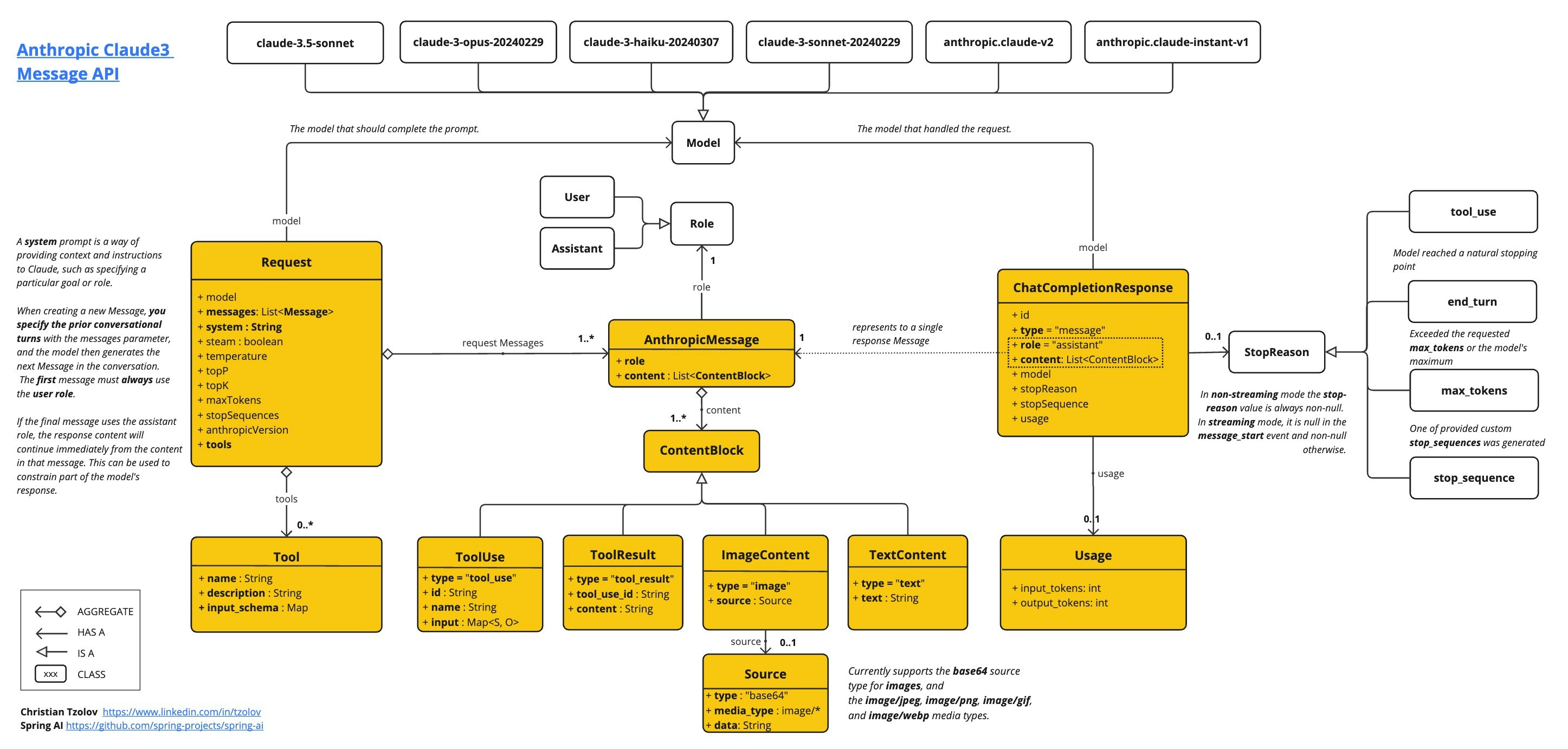
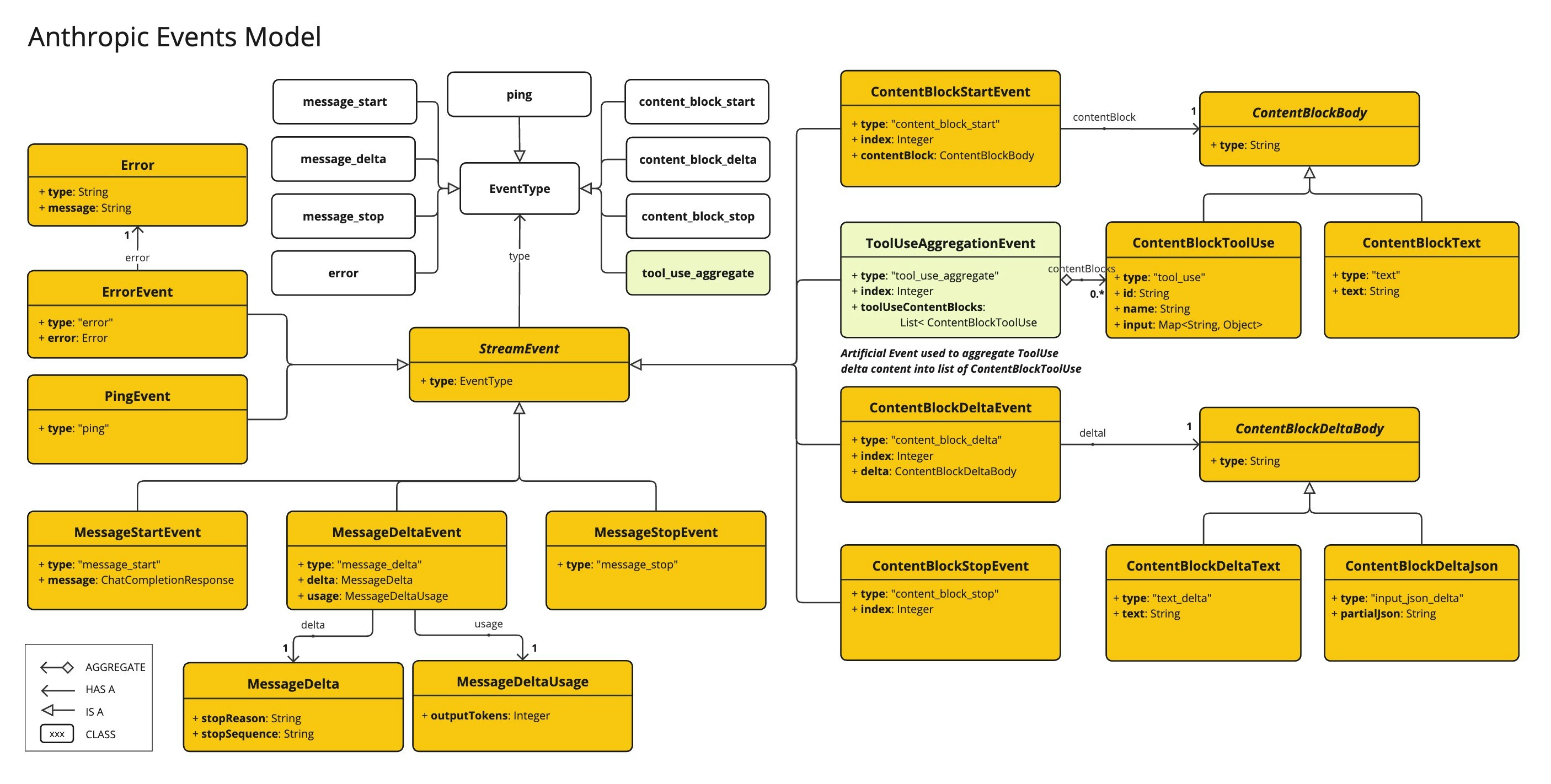
[AnthropicApi](https://github.com/spring-projects/spring-ai/blob/main/models/spring-ai-anthropic/src/main/java/org/springframework/ai/anthropic/api/AnthropicApi.java) 提供了轻量级的 Java 客户端,用于 [Anthropic 消息 API](https://docs.anthropic.com/claude/reference/messages_post)。
以下类图说明了 `AnthropicApi` 聊天接口和构建块:
以及文本消息"解释一下你在这张图片上看到了什么?",并生成如下响应:
```
图片显示了一个装满水果的金属丝水果篮的特写视图。
...
```
### PDF
从 Sonnet 3.5 开始,提供了 [PDF 支持(测试版)](https://docs.anthropic.com/en/docs/build-with-claude/pdf-support)。
使用 `application/pdf` 媒体类型将 PDF 文件附加到消息:
```java theme={"system"}
var pdfData = new ClassPathResource("/spring-ai-reference-overview.pdf");
var userMessage = new UserMessage(
"你是一位非常专业的文档摘要专家。请总结给定的文档。",
List.of(new Media(new MimeType("application", "pdf"), pdfData)));
var response = this.chatModel.call(new Prompt(List.of(userMessage)));
```
## 示例控制器
[创建](https://start.spring.io/)一个新的 Spring Boot 项目,并将 `spring-ai-starter-model-anthropic` 添加到你的 pom (或 gradle) 依赖项中。
在 `src/main/resources` 目录下添加一个 `application.properties` 文件,以启用和配置 Anthropic 聊天模型:
```properties theme={"system"}
spring.ai.anthropic.api-key=你的API密钥
spring.ai.anthropic.chat.options.model=claude-3-5-sonnet-latest
spring.ai.anthropic.chat.options.temperature=0.7
spring.ai.anthropic.chat.options.max-tokens=450
```
将 `api-key` 替换为你的 Anthropic 凭据。
这将创建一个 `AnthropicChatModel` 实现,你可以将其注入到你的类中。
以下是一个简单的 `@Controller` 类的示例,该类使用聊天模型进行文本生成。
```java theme={"system"}
@RestController
public class ChatController {
private final AnthropicChatModel chatModel;
@Autowired
public ChatController(AnthropicChatModel chatModel) {
this.chatModel = chatModel;
}
@GetMapping("/ai/generate")
public Map generate(@RequestParam(value = "message", defaultValue = "给我讲个笑话") String message) {
return Map.of("generation", this.chatModel.call(message));
}
@GetMapping("/ai/generateStream")
public Flux generateStream(@RequestParam(value = "message", defaultValue = "给我讲个笑话") String message) {
Prompt prompt = new Prompt(new UserMessage(message));
return this.chatModel.stream(prompt);
}
}
```
## 手动配置
[AnthropicChatModel](https://github.com/spring-projects/spring-ai/blob/main/models/spring-ai-anthropic/src/main/java/org/springframework/ai/anthropic/AnthropicChatModel.java) 实现了 `ChatModel` 和 `StreamingChatModel`,并使用[低级 AnthropicApi 客户端](#low-level-anthropicapi-client)连接到 Anthropic 服务。
将 `spring-ai-anthropic` 依赖项添加到项目的 Maven `pom.xml` 文件中:
```xml theme={"system"}
org.springframework.ai
spring-ai-anthropic
```
或添加到你的 Gradle `build.gradle` 构建文件中。
```gradle theme={"system"}
dependencies {
implementation 'org.springframework.ai:spring-ai-anthropic'
}
```
请参阅[依赖管理](/spring4ai/getting-started#dependency-management)部分,将 Spring AI BOM 添加到你的构建文件中。
接下来,创建一个 `AnthropicChatModel` 并将其用于文本生成:
```java theme={"system"}
var anthropicApi = new AnthropicApi(System.getenv("ANTHROPIC_API_KEY"));
var chatModel = new AnthropicChatModel(this.anthropicApi,
AnthropicChatOptions.builder()
.model("claude-3-opus-20240229")
.temperature(0.4)
.maxTokens(200)
.build());
ChatResponse response = this.chatModel.call(
new Prompt("生成 5 个著名海盗的名字。"));
// 或使用流式响应
Flux response = this.chatModel.stream(
new Prompt("生成 5 个著名海盗的名字。"));
```
`AnthropicChatOptions` 为聊天请求提供配置信息。
`AnthropicChatOptions.Builder` 是流畅的选项构建器。
## 低级 AnthropicApi 客户端
[AnthropicApi](https://github.com/spring-projects/spring-ai/blob/main/models/spring-ai-anthropic/src/main/java/org/springframework/ai/anthropic/api/AnthropicApi.java) 提供了轻量级的 Java 客户端,用于 [Anthropic 消息 API](https://docs.anthropic.com/claude/reference/messages_post)。
以下类图说明了 `AnthropicApi` 聊天接口和构建块:
 以下是一个简单的代码片段,展示了如何以编程方式使用 API:
```java theme={"system"}
AnthropicApi anthropicApi =
new AnthropicApi(System.getenv("ANTHROPIC_API_KEY"));
AnthropicMessage chatCompletionMessage = new AnthropicMessage(
List.of(new ContentBlock("给我讲个笑话?")), Role.USER);
// 同步请求
ResponseEntity response = this.anthropicApi
.chatCompletionEntity(new ChatCompletionRequest(AnthropicApi.ChatModel.CLAUDE_3_OPUS.getValue(),
List.of(this.chatCompletionMessage), null, 100, 0.8, false));
// 流式请求
Flux response = this.anthropicApi
.chatCompletionStream(new ChatCompletionRequest(AnthropicApi.ChatModel.CLAUDE_3_OPUS.getValue(),
List.of(this.chatCompletionMessage), null, 100, 0.8, true));
```
有关更多信息,请参阅 [AnthropicApi.java](https://github.com/spring-projects/spring-ai/blob/main/models/spring-ai-anthropic/src/main/java/org/springframework/ai/anthropic/api/AnthropicApi.java) 的 JavaDoc。
### 低级 API 示例
* [AnthropicApiIT.java](https://github.com/spring-projects/spring-ai/blob/main/models/spring-ai-anthropic/src/test/java/org/springframework/ai/anthropic/chat/api/AnthropicApiIT.java) 测试提供了一些有关如何使用轻量级库的常规示例。
发现文档问题?点击此处直接在 GitHub 上编辑并提交 PR,帮助我们改进文档!
以下是一个简单的代码片段,展示了如何以编程方式使用 API:
```java theme={"system"}
AnthropicApi anthropicApi =
new AnthropicApi(System.getenv("ANTHROPIC_API_KEY"));
AnthropicMessage chatCompletionMessage = new AnthropicMessage(
List.of(new ContentBlock("给我讲个笑话?")), Role.USER);
// 同步请求
ResponseEntity response = this.anthropicApi
.chatCompletionEntity(new ChatCompletionRequest(AnthropicApi.ChatModel.CLAUDE_3_OPUS.getValue(),
List.of(this.chatCompletionMessage), null, 100, 0.8, false));
// 流式请求
Flux response = this.anthropicApi
.chatCompletionStream(new ChatCompletionRequest(AnthropicApi.ChatModel.CLAUDE_3_OPUS.getValue(),
List.of(this.chatCompletionMessage), null, 100, 0.8, true));
```
有关更多信息,请参阅 [AnthropicApi.java](https://github.com/spring-projects/spring-ai/blob/main/models/spring-ai-anthropic/src/main/java/org/springframework/ai/anthropic/api/AnthropicApi.java) 的 JavaDoc。
### 低级 API 示例
* [AnthropicApiIT.java](https://github.com/spring-projects/spring-ai/blob/main/models/spring-ai-anthropic/src/test/java/org/springframework/ai/anthropic/chat/api/AnthropicApiIT.java) 测试提供了一些有关如何使用轻量级库的常规示例。
发现文档问题?点击此处直接在 GitHub 上编辑并提交 PR,帮助我们改进文档!