> ## Documentation Index
> Fetch the complete documentation index at: https://javaai.pig4cloud.com/llms.txt
> Use this file to discover all available pages before exploring further.
# 多模态 API
> "所有与自然相关的事物都应该结合起来教授" - John Amos Comenius, "Orbis Sensualium Pictus", 1658
人类同时通过多种数据输入模式处理知识。
我们学习的方式、我们的经历都是多模态的。
我们不仅仅有视觉、音频和文本。
与这些原则相反,机器学习往往专注于处理单一模态的专门模型。
例如,我们开发了用于文本到语音或语音到文本等任务的音频模型,以及用于对象检测和分类等任务的计算机视觉模型。
然而,新一代的多模态大型语言模型开始出现。
例如,OpenAI 的 GPT-4o、Google 的 Vertex AI Gemini 1.5、Anthropic 的 Claude3,以及开源产品 Llama3.2、LLaVA 和 BakLLaVA 都能够接受多种输入,包括文本图像、音频和视频,并通过整合这些输入生成文本响应。
多模态大型语言模型(LLM)功能使模型能够处理文本并结合其他模态(如图像、音频或视频)生成文本。
## Spring AI 多模态
多模态指的是模型同时理解和处理来自各种来源的信息的能力,包括文本、图像、音频和其他数据格式。
Spring AI Message API 提供了支持多模态 LLM 所需的所有抽象。
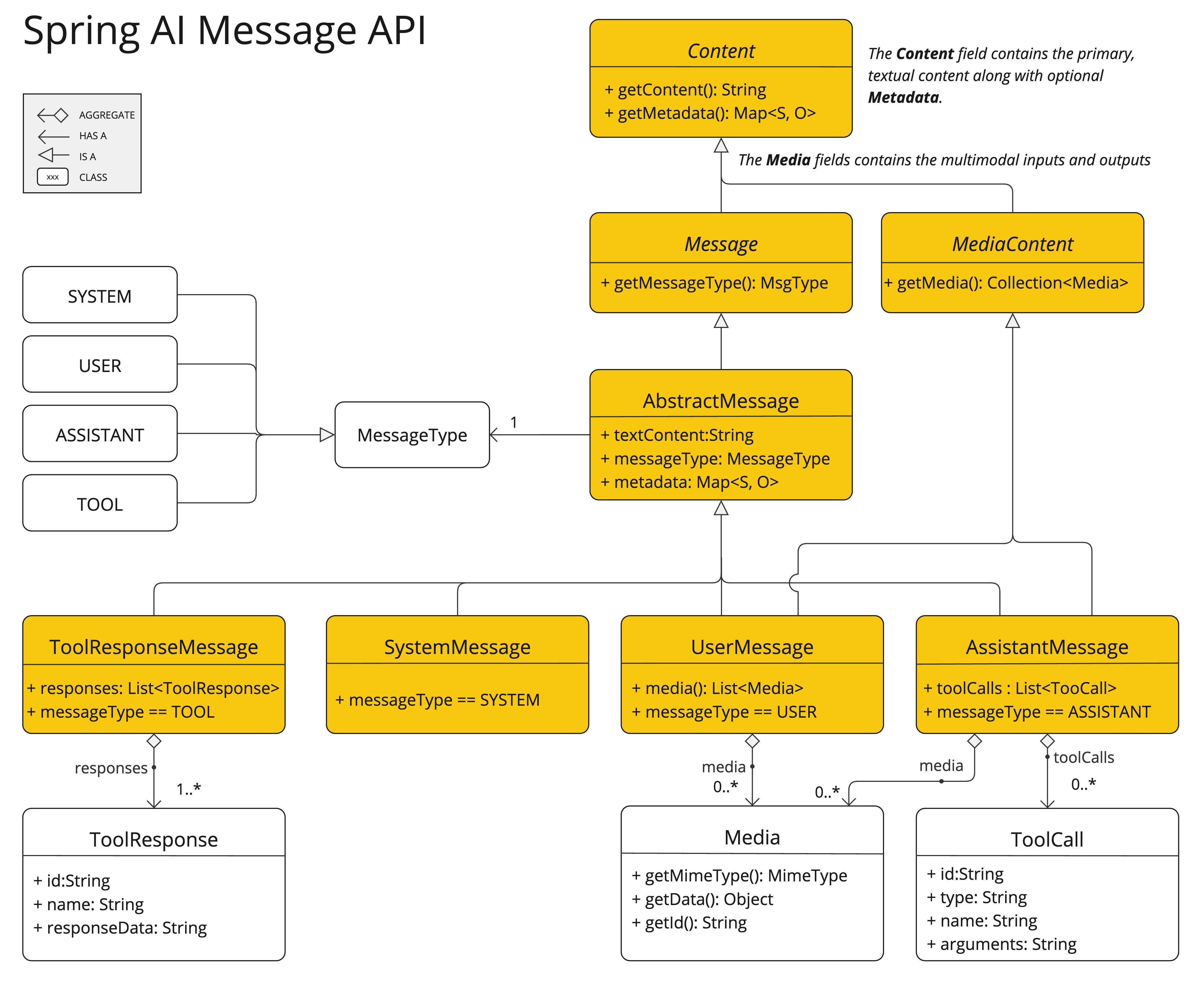 UserMessage 的 `content` 字段主要用于文本输入,而可选的 `media` 字段允许添加一个或多个不同模态的额外内容,如图像、音频和视频。
`MimeType` 指定模态类型。
根据使用的 LLM,`Media` 数据字段可以是作为 `Resource` 对象的原始媒体内容,也可以是内容的 `URI`。
media 字段目前仅适用于用户输入消息(例如,`UserMessage`)。它对系统消息没有意义。包含 LLM 响应的 `AssistantMessage` 仅提供文本内容。要生成非文本媒体输出,您应该使用专门的单模态模型之一。
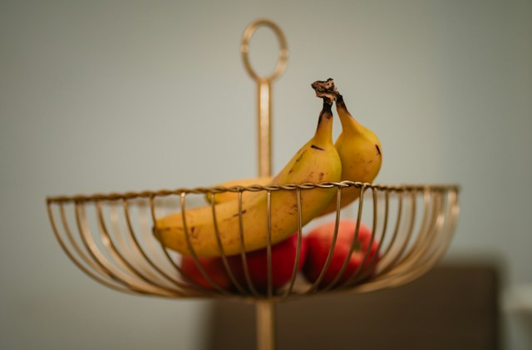
例如,我们可以将以下图片(`multimodal.test.png`)作为输入,并要求 LLM 解释它看到的内容。
UserMessage 的 `content` 字段主要用于文本输入,而可选的 `media` 字段允许添加一个或多个不同模态的额外内容,如图像、音频和视频。
`MimeType` 指定模态类型。
根据使用的 LLM,`Media` 数据字段可以是作为 `Resource` 对象的原始媒体内容,也可以是内容的 `URI`。
media 字段目前仅适用于用户输入消息(例如,`UserMessage`)。它对系统消息没有意义。包含 LLM 响应的 `AssistantMessage` 仅提供文本内容。要生成非文本媒体输出,您应该使用专门的单模态模型之一。
例如,我们可以将以下图片(`multimodal.test.png`)作为输入,并要求 LLM 解释它看到的内容。
 对于大多数多模态 LLM,Spring AI 代码如下所示:
```java theme={"system"}
var imageResource = new ClassPathResource("/multimodal.test.png");
var userMessage = new UserMessage(
"解释你在这张图片中看到了什么?", // content
new Media(MimeTypeUtils.IMAGE_PNG, this.imageResource)); // media
ChatResponse response = chatModel.call(new Prompt(this.userMessage));
```
或使用流畅的 [ChatClient](/spring4ai/api/chatclient) API:
```java theme={"system"}
String response = ChatClient.create(chatModel).prompt()
.user(u -> u.text("解释你在这张图片上看到了什么?")
.media(MimeTypeUtils.IMAGE_PNG, new ClassPathResource("/multimodal.test.png")))
.call()
.content();
```
并产生如下响应:
> 这是一张设计简单的水果碗图片。碗由金属制成,边缘是弯曲的金属丝,形成一个开放式结构,可以从各个角度看到水果。碗里有两个黄色的香蕉放在一个红色的苹果上面。香蕉略微过熟,可以从果皮上的棕色斑点看出。碗的顶部有一个金属环,可能是用来提携的把手。碗放在一个平面上,背景是中性色,可以清楚地看到碗里的水果。
## 支持的多模态模型
Spring AI 为以下聊天模型提供多模态支持:
支持图像输入进行分析和推理
亚马逊的多模态对话 AI 服务
支持 GPT-4o 和其他多模态模型
具有图像理解能力的 Mistral Pixtral 模型
支持开源多模态模型,如 LLaVA、BakLLaVA 和 Llama3.2
具有视觉能力的 GPT-4 和 GPT-4o 模型
具有多模态能力的 Google Gemini 模型(gemini-1.5-pro-001、gemini-1.5-flash-001)
发现文档问题?点击此处直接在 GitHub 上编辑并提交 PR,帮助我们改进文档!
对于大多数多模态 LLM,Spring AI 代码如下所示:
```java theme={"system"}
var imageResource = new ClassPathResource("/multimodal.test.png");
var userMessage = new UserMessage(
"解释你在这张图片中看到了什么?", // content
new Media(MimeTypeUtils.IMAGE_PNG, this.imageResource)); // media
ChatResponse response = chatModel.call(new Prompt(this.userMessage));
```
或使用流畅的 [ChatClient](/spring4ai/api/chatclient) API:
```java theme={"system"}
String response = ChatClient.create(chatModel).prompt()
.user(u -> u.text("解释你在这张图片上看到了什么?")
.media(MimeTypeUtils.IMAGE_PNG, new ClassPathResource("/multimodal.test.png")))
.call()
.content();
```
并产生如下响应:
> 这是一张设计简单的水果碗图片。碗由金属制成,边缘是弯曲的金属丝,形成一个开放式结构,可以从各个角度看到水果。碗里有两个黄色的香蕉放在一个红色的苹果上面。香蕉略微过熟,可以从果皮上的棕色斑点看出。碗的顶部有一个金属环,可能是用来提携的把手。碗放在一个平面上,背景是中性色,可以清楚地看到碗里的水果。
## 支持的多模态模型
Spring AI 为以下聊天模型提供多模态支持:
支持图像输入进行分析和推理
亚马逊的多模态对话 AI 服务
支持 GPT-4o 和其他多模态模型
具有图像理解能力的 Mistral Pixtral 模型
支持开源多模态模型,如 LLaVA、BakLLaVA 和 Llama3.2
具有视觉能力的 GPT-4 和 GPT-4o 模型
具有多模态能力的 Google Gemini 模型(gemini-1.5-pro-001、gemini-1.5-flash-001)
发现文档问题?点击此处直接在 GitHub 上编辑并提交 PR,帮助我们改进文档!